
Straight lines can make tone
A string art portrait has no shading in the usual sense. Every mark is a straight thread stretched between two nails on the edge of the board, and every thread crosses the whole board. The picture appears because threads overlap. Where many of them cross, the board is mostly covered and reads as dark. Where few pass, the board shows through and reads as light.
The generator starts by turning your cropped photo into a grayscale map of how much thread each small area should hold. It models thread the way it behaves on a pale board: one pass covers part of an area, a second pass covers part of what is still visible, and so on. Each extra strand darkens an area a little less than the one before. An area can never become darker than fully covered, which is why the deepest shadows in a string art piece look dense rather than black.
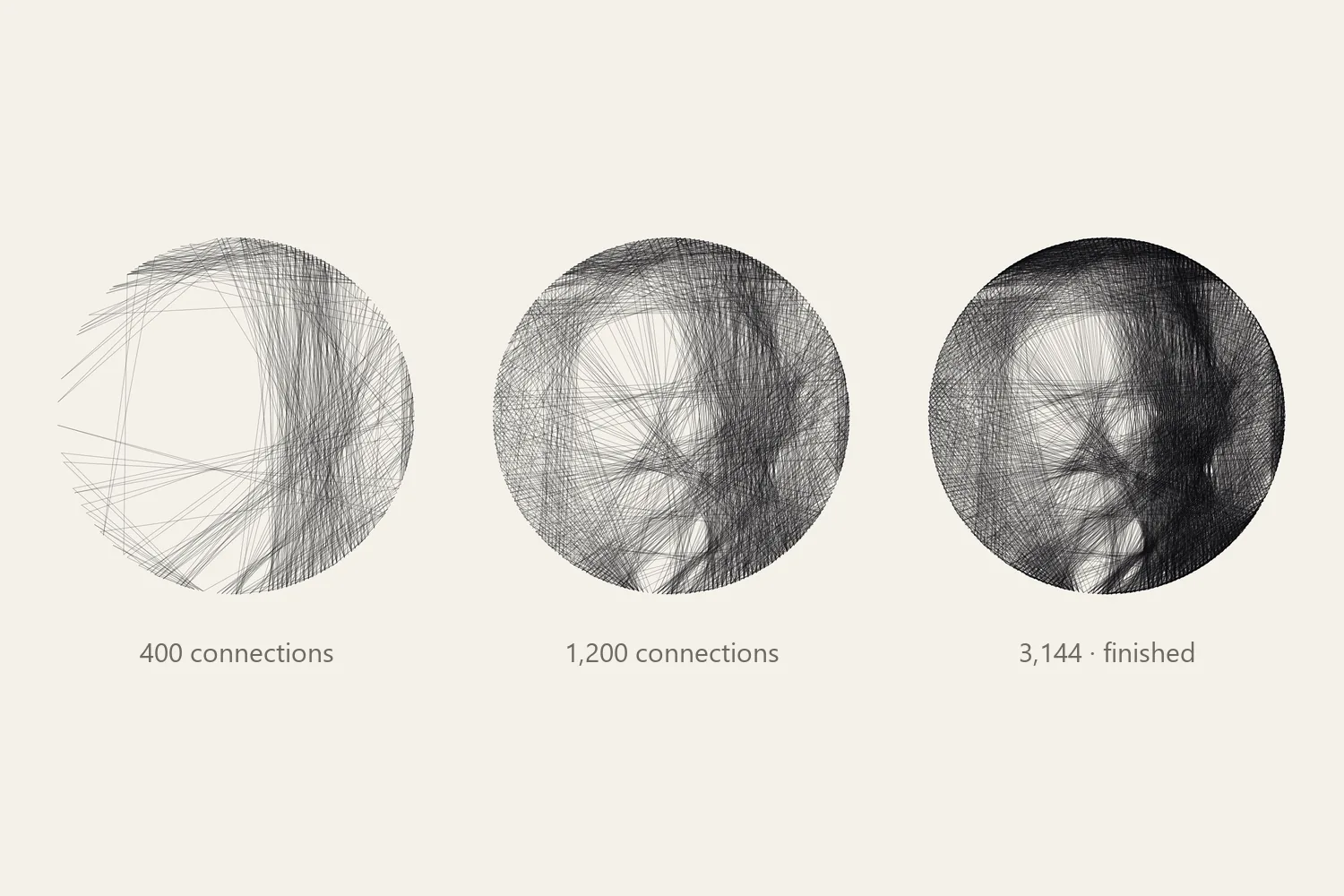
The figure above shows the same pattern at three points along its route. After 400 connections there are only long, loose strokes. By 1,200 the main shapes have appeared. The finished route, 3,144 connections on a 50 cm board with 240 nails, adds the tone that makes the face read from across a room.
The route is chosen one nail at a time
You will wind one continuous thread, so every connection must start at the nail where the previous one ended. The generator follows the same rule. From the current nail it considers the straight connections to the other nails, estimates how each one would change the picture, and takes the one that brings the pattern closest to the photo. The thread now sits at the new nail, and the search begins again from there.
“Closest” is measured on small patches of the image rather than on single pixels, because the eye reads the average darkness of an area, not each strand. A connection earns its place by darkening patches that should be dark. It is penalised for crossing patches that are already dark enough or should stay light: a forehead, the highlight in an eye, a pale background.
Connections between nails that sit close together are left out. A short chord near the rim adds almost nothing to the picture and is awkward to wind, so there is a minimum gap counted in nails. With 240 nails, a thread always lands at least nine nails along the rim from the nail it left.
Why the search stops before your maximum
The Maximum lines setting is an upper limit, not a target. The search stops as soon as no remaining connection would improve the picture. The portrait in the figure was allowed 4,000 lines and stopped at 3,144, because every further line would have darkened an area that was already dark enough.
This is why adding lines rarely rescues a weak result. Once the dark areas are full, more thread can only land where the image should be lighter, and the face starts to fill in. If a preview looks muddy, change the photo, the thread thickness or the nail count instead. The guide to fixing dark patterns takes those changes one at a time.
Legibility is a measurement, not a guess. After generating a single-thread photo pattern, the studio rates it Good, Fair or Weak by comparing the planned thread coverage with your prepared photo. Use it to compare two versions of the same subject; it cannot tell you whether you like the result.
A second look at the finished route
Choosing one connection at a time has a weakness. An early choice can look right when it is made and become unnecessary once later lines fill the same area. After the first route is complete, the generator goes back over it. For each nail along the way, it checks whether a different nail would better serve both the connection arriving there and the connection leaving it, and moves that stop if so. The route stays continuous and keeps the same spacing rules, so you still follow a single path from the first nail to the last.
What your settings change
- Nails set how many directions a thread can take. More nails allow finer angles, but they also sit closer together on the board. The materials guide shows how to check the spacing.
- Thread thickness tells the generator how much of the board one pass covers. A thick thread fills an area in fewer passes, so the route is shorter. Set it to the thread you will actually use.
- Board width fixes the physical scale. It changes the thread length and, together with thickness, how much of the board each strand covers.
- Contrast and brightness change the photo before the search starts, and so change which areas ask for thread.
- The focus brush marks areas, such as the eyes, where errors count for more. The search then spends more care there and less on the background.
Colour patterns use the same search once for each thread colour, with the photo separated into layers first. Make room for color explains how those layers work.
Put it into practice
Try your image, inspect the preview, and save the pattern that works for your project.
Open the generator